
Docyt
Research and Design | B2B | Bookkeeping | Reconciliation | Expense Management
Docyt is an industry leading platform which aims to transform accounting from a complex, manual and fragmented process into an intelligent, automated and collaborative experience. By leveraging AI, it empower accountants, firms and business owners with real-time insights and simplified decision-making.
Project
-
Team: Docyt Copilot
-
Timeline: Aug 2025 - Oct 2025
-
My Role: Product Design Owner
-
Resposibilities: Meetings with Leadership, Design Thinking Framework, User Studies, End to end UI and UX, Wireframing, Validations, Prototyping, Final Testing and Design Acceptance
-
Cross Functional Partners: 1 Product Manager, 1 Engineering Manager (4 Engineers), 1 Automation Engineer (QA), CEO, CTO and Product Head.
Context
Bookkeepers and accounting firms face continuous challenges with:
-
Complex workflows spread across multiple screens and members.
-
High cognitive load in tracking reconciliation, audits and closing books.
-
Navigation issues causing inefficiencies and errors.
-
Lack of visibility on real-time progress of tasks like reconciliation, anomalies and other open items.
The old experience required multiple navigation layers (e.g, Tasks → Accounting → Clients/Businesses → Module). This created friction and time waste for accountants, who are under pressure to deliver fast and accurate financials especially while closing a month.
Client Goals
-
Manage Outsourced bookkeepers
-
Insights to grow business
-
Do only what matters the most
-
Automate the process
Project Objectives
-
Reduce manual effort in reconciliation, auditing and month-end closing through AI automation.
-
Increase visibility and control across multiple clients and workflows in one unified view.
-
Minimize cognitive load by reducing back and forth navigation across multiple screens.
-
Enable collaboration among accountants, accounting firms and clients with contextual tools.
-
Build trust in AI-powered automation while keeping business values and transparency at the center.
Methodology
01
Design Audit and Research
• Usability Issues
• Contextual Inquiry
• Design validations through user interviews
• Demo Videos - Grain & Looms
• Analysis from engineering support (ES) tickets
02
Competitive Analysis
• Otelier
• Bill.com
• M3
• InnFlow
03
Design Proposal and Validation
• Ideal User Journey
• Lo-fi flows - Figjam/Paper
• End user representatives and internal stakeholder's feedback
• Visual Journey
• Design Revision/Closure
04
Implementation and Design QA
• Dev hand-off and Grooming
• Engineering epic and tickets
• Testing
• Users and Stakeholder's Feedback
• Validate and Improve
Important Terminologies
Transaction Categorization: Classifying financial transactions into appropriate accounts (like expense, income) for clear bookkeeping.
Reconciliation: Process of matching transactions in accounting books with bank statements to ensure accuracy.
Audit Scan: Automated check that identifies anomalies, variances and errors in the books for review and correction.
Month End Close: Final step of accounting to ensure all books are reconciled, anomalies resolved and financials locked for reporting.
Design Audit and Research
01
Design Audit
Conducting a heuristic evaluation, evaluators compare a predefined set of specific usability principles with a product, app or website interface while attempting to accomplish actual system tasks.
Research
To deeply understand the day-to-day challenges accountants face, we conducted contextual inquiry by visiting their workplaces and observing them in their real work environment.
Key Findings 💡
Tasks

Accounting - Clients/Businesses

Dashboard

Note : Only a few key screens are presented here. A detailed analysis of all screens was conducted and factored into the design process.
Key Issues
Aesthetics & Minimalism
User Control & Freedom
Navigation
Error Prevention
Help users recognise, diagnose, and recover from errors
Users Trust
Spend days in month end close
Back and Forth - Disconnected External Integrations
Takeaways from Contextual Inquiry 📖
-
Identified inefficiencies in multi-screen navigation and slow workflows.
-
Manual categorization and missed anomalies are full of hassles.
-
Very familiar with excel like structure.
-
Have a workaround for minor bugs but did not report them.
-
Bookkeepers want automation, but still need manual control on low confidence items.
-
Accounting firms want visibility across multiple clients in a single view
-
Business owners want simplified views and insights.
.jpg)
.jpg)
Ideal Customer Profiles 👨💼
STELLA BAGLAN
Accountants / Bookkeepers –
• Manage transactions, reconciliations, audits
• Needs efficiency and reduced manual workload
• Needs automation for repetitive tasks
• Wants alerts on anomalies
STEVE MARTIN
Accounting Firms (Admins / Partners)
• Oversee multiple clients. Require visibility across accounts and anomalies
• Progress of month-end closes
• Manages 20+ clients
• Needs visibility and status overview
MEHUL PATEL
Business Owners
• Review books, approvals, vendor payments.
• Need transparency without being overwhelmed
• Needs insights
• Wants to approve/pay without accounting clutter
User Journey Map 🛣️

02
Competitive Analysis


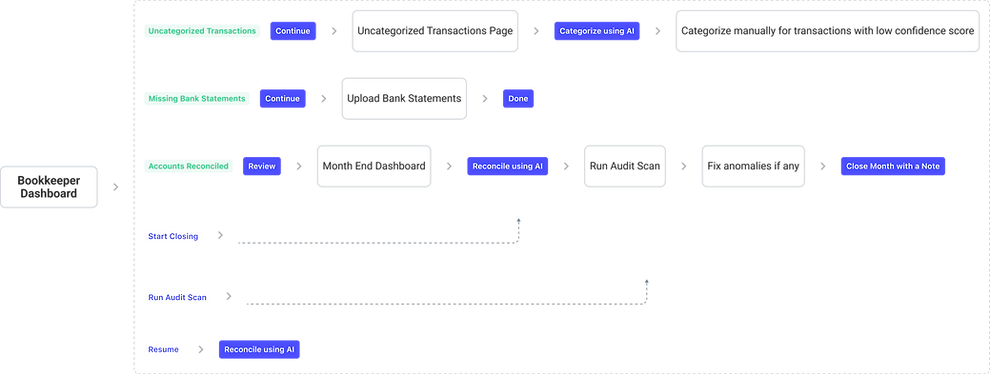



Key Visuals 💻
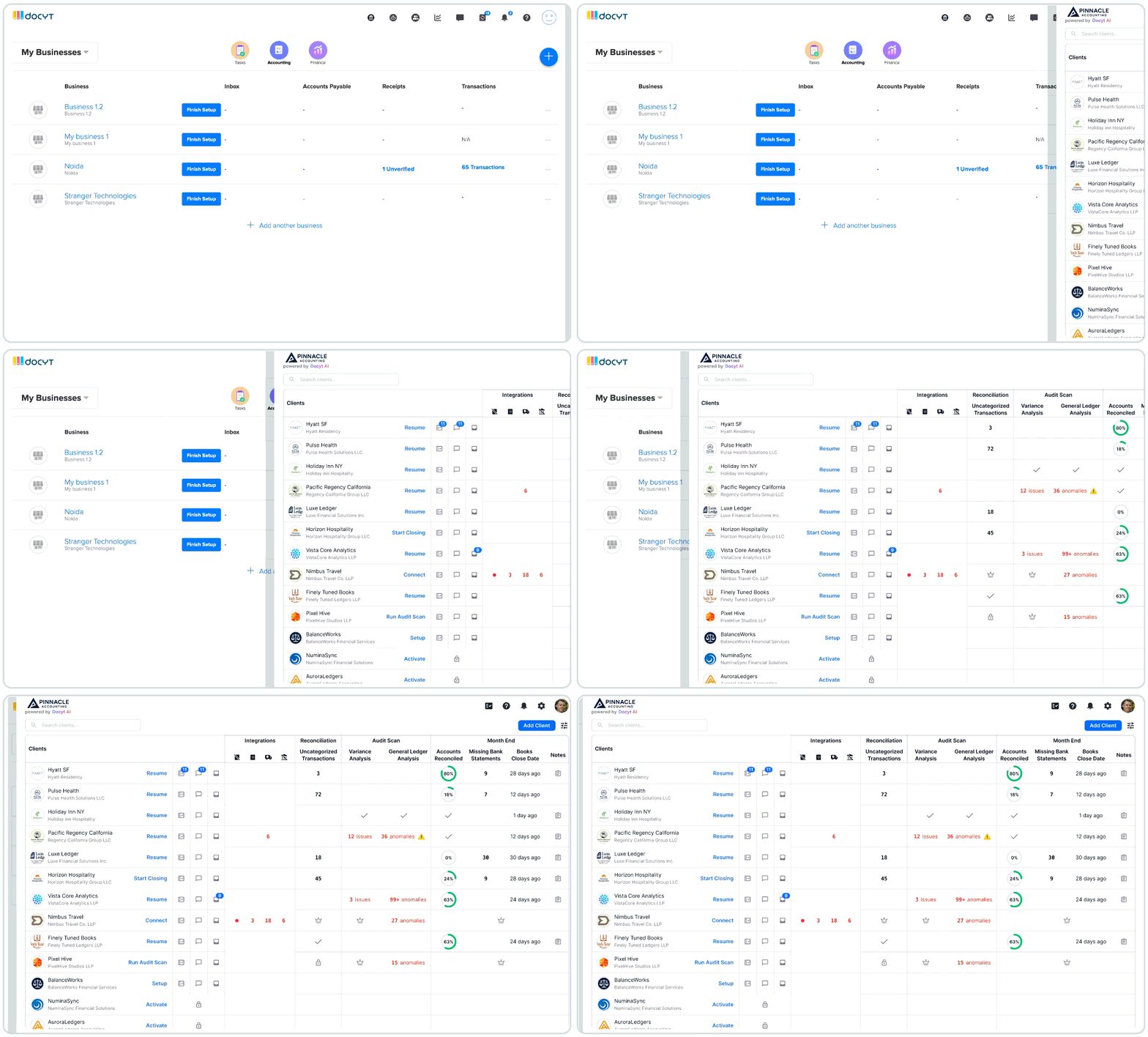
One Dashboard - Manage Clients at Scale
Contextual CTAs | Distinguished Anomalies | Great Visibility across Portfolio | Nudge for Upsell
Month End Close at a Glance

Post Launch Testimonials ✨


Thanks for your time!
The Game Changer: Close cycles shrink from weeks to hours.