
Redesigning month-end close for a distributed, multi-business workflow
Product Design Owner | Aug – Oct 2025 | B2B SaaS | AI Copilot
Docyt is an industry leading platform which aims to transform accounting from a complex, manual and fragmented process into an intelligent, automated and collaborative experience.
Docyt needed to turn a fragmented, multi-screen bookkeeping tool into a single trusted workspace where accountants managing dozens of hospitality clients could see everything that needed attention, act on AI-flagged items with confidence and close the books in hours instead of weeks.

I owned this end-to-end including Research, IA, Userflow, Visual Journeys, and Dev hand-off and Design Acceptance, partnering with 1 PM, 1 EM (4 engineers), 1 QA automation engineer and reporting directly to the CEO, CTO and Head of Product.
Who are the users
Role
Bookkeepers who log in daily, move across multiple client businesses from one dashboard, and complete reconciliation, categorization, and close activities there.
Regions
Split team, bookkeepers based in India and the USA, working the same accounts. Customer base is entirely US hospitality: hotels, restaurants, multi-unit operators.
Mindset
Fluent in excel like structures. Not resistant to change, resistant to automation they can't audit.
Internal Stakeholders
CEO, CTO, Product Head and the Post-Onboarding team, all US based.
Project constraints
Resources
-
No single time zone, India and US split across bookkeeping, engineering and leadership.
-
A single validation from US leadership could take up to 12 hours to come back.
Business
-
Fixed Aug-Oct window, visible progress expected every sprint.
-
Had to work for a 3 property operator and a 40 property portfolio alike.
Trust & Technical
-
AI anomalies flagged with no confidence signal, users re-checked everything.
-
Legacy 4 layer navigation deeply embedded in daily muscle memory.
Primary Flow
Log in → land on multi-business dashboard → pick a client → reconciliation → audit review → month-end close.
Working across time zones

The bookkeepers doing the work were split across India and the US. The customers they served were entirely US based, the people who needed to sign off like CXOs the Product Head and Post Onboarding team, were also in the US. A design decision could sit for half a day waiting on one round of validation.
Rather than let that stall the project, I shifted my own hours around theirs, staying online through early mornings or late evenings to create a real overlap window with the US team, instead of relying purely on async threads and next day replies. It turned what could have been a coordination bottleneck into one of the better i.e. run parts of the project, a working rhythm across a 12 hour gap.
Methodology
01
Design Audit and Research
• Usability Issues
• Contextual Inquiry
• Design validations through user interviews
• Demo Videos - Grain & Looms
• Analysis from engineering support (ES) tickets
02
Competitive Analysis
• Otelier
• Bill.com
• M3
• InnFlow
03
Design Proposal and Validation
• Ideal User Journey
• Lo-fi flows - Figjam/Paper
• End user representatives and internal stakeholder's feedback
• Visual Journey
• Design Revision/Closure
04
Implementation and Design QA
• Dev hand-off and Grooming
• Engineering epic and tickets
• Testing
• Users and Stakeholder's Feedback
• Validate and Improve
Important Terminologies
Transaction Categorization
Classifying financial transactions into appropriate accounts (like expense, income) for clear bookkeeping.
Reconciliation
Process of matching transactions in accounting books with bank statements to ensure accuracy.
Audit Scan
Automated check that identifies anomalies, variances and errors in the books for review and correction.
Month End Close
Final step of accounting to ensure all books are reconciled, anomalies resolved and financials locked for reporting.
Ideal Customer Profiles
STELLA BAGLAN
Accountants / Bookkeepers –
• Manage transactions, reconciliations, audits
• Needs efficiency and reduced manual workload
• Needs automation for repetitive tasks
• Wants alerts on anomalies
STEVE MARTIN
Accounting Firms (Admins / Partners)
• Oversee multiple clients. Require visibility across accounts and anomalies
• Progress of month-end closes
• Manages 20+ clients
• Needs visibility and status overview
MEHUL PATEL
Business Owners
• Review books, approvals, vendor payments.
• Need transparency without being overwhelmed
• Needs insights
• Wants to approve/pay without accounting clutter
Design Audit & Research
Design Audit
Heuristic evaluation against usability principles, screen by screen.
Contextual Inquiry
Sat with bookkeepers in their real work environment, watching live month-end closes, plus Grain/Loom recordings and engineering support tickets.
Competitive Analysis
To benchmark and find where the category had settled on the wrong defaults.


What isn't working
• Four navigation layers just to open one task
• AI flags every anomaly with equal weight
• No portfolio view for firms managing 20+ clients
• Bugs quietly worked around, never reported
What could work
• One dashboard, scoped to a multi-business day
• Confidence based flagging, auto resolve the obvious
• Single view of status and progress across every client
• A QA-designer loop tight enough to catch friction early
User Journey Map

Bookkeeper Userflow

Initial Design Approach & Validation


Explored two competing dashboard models early. A 360° single client view vs a client based portfolio approach. Then put both in front of end user representatives rather than settling it internally. The portfolio model won, reflecting how bookkeepers actually start their day.
Iterated through low fidelity flows, then moved to wires for the dashboard, key month end close steps. Each pass reviewed with internal stakeholders and end user representatives, scheduled around the US-timezone feedback loop.
Key Design Decisions
Portfolio first, not client first
The day starts on a multi-business dashboard, not inside one client.
AI Confidence
Every anomaly shows why it's flagged and how sure the system is.
Familiar over novel
Lean into the spreadsheet structure bookkeepers already trust.
Action oriented experience
Every insight connects to a next step, not just a status.

Visual Journey
One Dashboard - Manage Clients at Scale

Great Visibility across Portfolio | Contextual CTAs | Distinguished Anomalies | Progressive Dashboard
Transactions Categorization

Visibility of entire Month End Process | Copilot Nudges | Incremental Journey | Clear Navigation
Month End View

Consolidated View | Easy to Find & Fix | Quick Decision Making
Implementation & Design QA
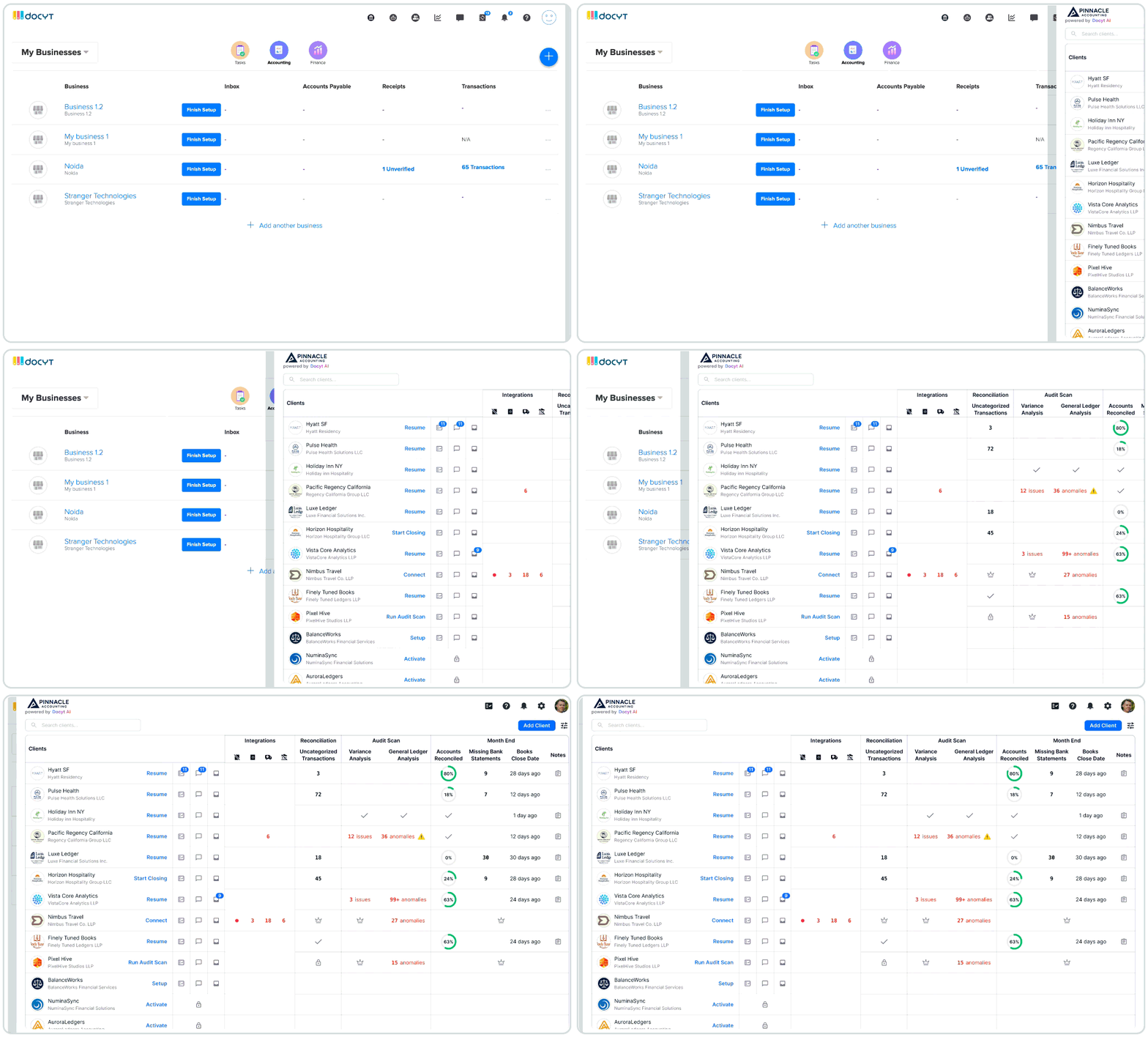
To meet our project timelines while working within existing platform capabilities and handling large data volumes, V1 launches with a focused, data-dense dashboard designed specifically to highlight high-priority anomalies.
Stayed embedded through engineering grooming rather than design handing off, ran design QA against shipped builds and closed the loop with a second round of user validation post launch to confirm the fix landed for the people doing the work.
Post launch Testimonials


Month-end close cycle time reduced from Weeks to Hours.
Navigation layers collapsed from 4 to 1 view.
Learning for me
What worked well
Shifting my own hours to overlap with the US team turned a 12 hour gap into a working rhythm instead of a bottleneck.
Growth as a designer
Learned to design for trust in AI output as much as the interface around it and to treat distributed team logistics as a design constraint worth solving deliberately.